 Lifetime Replacement

4.6'' Mini Display Screen for Tesla Model 3 / Y
Model Y (2020+) & Model 3 (2017-2023.08)
$172.38 USD
Skip to product information


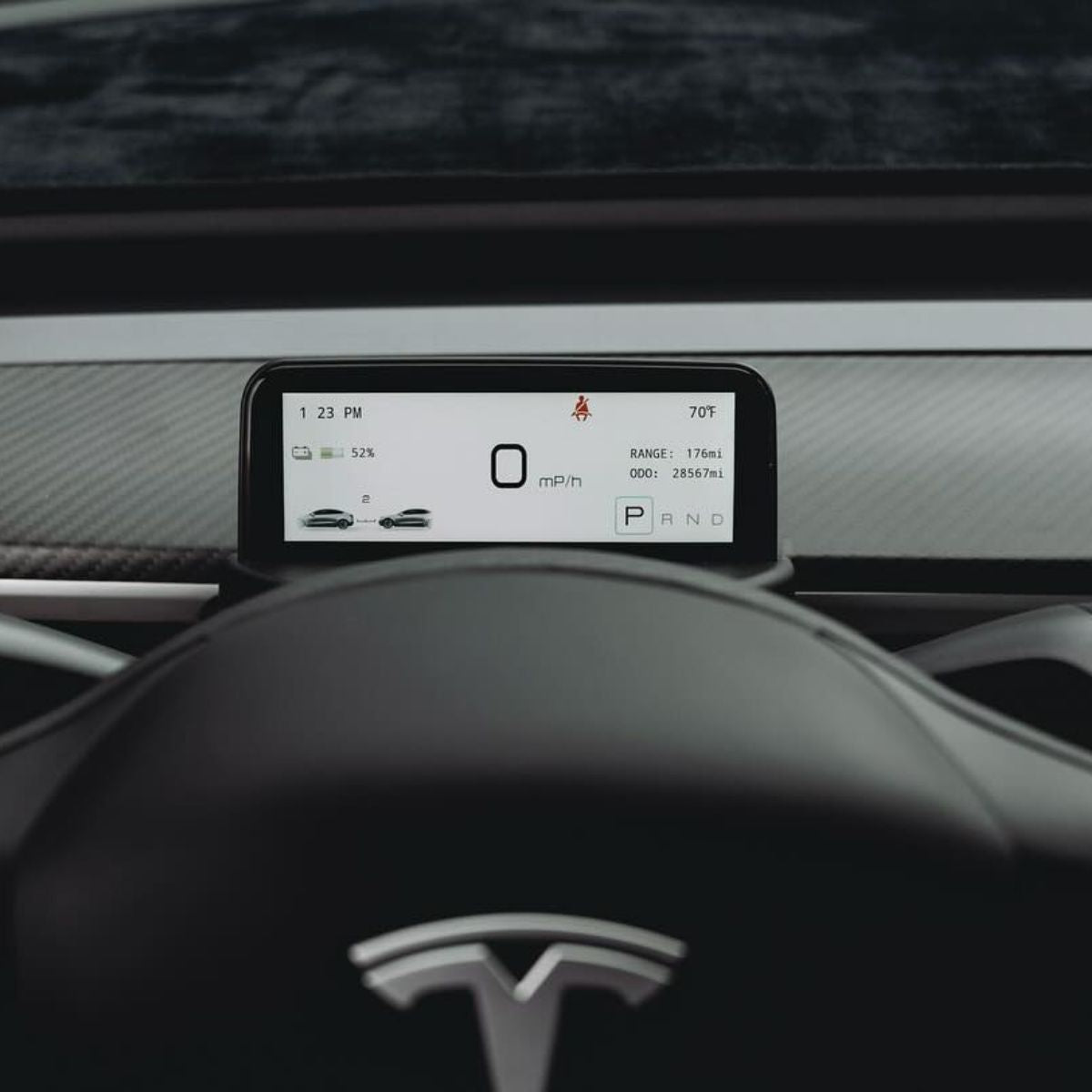


4.6'' Mini Display Screen for Tesla Model 3 / Y
$172.38 USD
Screen Product Warranty
Warranty
All Screens Include
1-Year Warranty
 Product Description
 Product Description
4.6″ Mini Instrument Display for Tesla Model 3 & Model Y
Put essential driving information directly in front of the steering wheel with a compact 4.6-inch IPS instrument display that mirrors key Tesla vehicle data while preserving dashboard airflow and the clean factory-style cabin layout.
4.6″ IPS · 960×320 · Linux · Intel / AMD compatible
👀
Key Data in Your Forward View
View speed, gear, battery, range and other important vehicle information directly behind the steering wheel instead of relying only on the center touchscreen.
🖥️
960×320 IPS Display
The 4.6-inch IPS screen uses a wide 960×320 format designed specifically for compact instrument-cluster information.
🌬️
Preserves Dashboard Airflow
Its low-profile integrated housing is shaped around the dashboard so the screen does not sit directly across the main air outlet path.
Why This Mini Instrument Display Stands Out
⚡
Real-time vehicle information
The display reads compatible Tesla vehicle data and presents frequently used driving information without requiring you to open menus on the main center screen.
🎛️
Steering-wheel scroll control
Access display settings using the right steering-wheel scroll control instead of adding a separate button or handheld remote.
☀️
Day & night display modes
Brightness and display appearance can adapt between lighter daytime and darker nighttime viewing conditions.
🧠
Intel & AMD vehicle support
Separate wiring configurations are provided for Tesla vehicles equipped with Intel Atom or AMD Ryzen infotainment hardware.
🔌
Non-destructive plug-and-play integration
Vehicle-specific connectors and an integrated trim housing are designed to install without cutting the original Tesla wiring.
Driver Information Display — Not an Entertainment Screen
This 4.6-inch unit is designed primarily as a mini instrument cluster. Current product documentation does not publish Apple CarPlay, Android Auto, video streaming, Wi-Fi, Bluetooth entertainment or touchscreen functionality.
See the Vehicle Information You Use Most
Speed & Gear
Current vehicle speed and P / R / N / D gear status.
Battery & Range
Battery state and manufacturer-listed remaining driving range.
Turn Signals
Left and right turn-indicator status.
Exterior Lights
High beam, low beam, position / contour and fog-light status.
Door & Seat Belt
Door-open information and seat-belt reminder status.
Tire Pressure
Tire-pressure information when supported and available from the vehicle.
Mileage & Odometer
Manufacturer-listed driving mileage and odometer information.
Outside Temperature
Exterior temperature data displayed within the instrument UI.
Manufacturer-Listed Navigation & Autopilot Information
Current Tesery documentation also lists navigation instructions and Autopilot status among supported display information. Exact information shown can depend on vehicle, firmware and communication protocol.
Check Vehicle Year & Processor Before Installation
Current Model 3 Selector
2017–2023.08
Current Model Y Selector
2020–2025.03
Drive Position
LHD & RHD Supported
Intel Atom
Vehicles equipped with the Intel infotainment processor require the matching Intel wiring configuration.
AMD Ryzen
Vehicles equipped with the AMD infotainment processor require the corresponding AMD wiring configuration.
1. Check the Infotainment Processor
On the Tesla center screen, open Software → Additional Vehicle Information and check whether the infotainment processor is Intel Atom or AMD Ryzen.
2. Match the Correct Harness
Use the processor-matched wiring harness rather than assuming Intel and AMD connections are interchangeable.
3. Access the Dashboard Trim
Carefully access the required driver-side dashboard trim and vehicle connector according to the installation guide.
4. Connect the Plug-and-Play Harness
Connect the supplied matching harness without cutting or splicing the original Tesla wiring.
5. Fit the Integrated Display Housing
Install the molded mini-cluster housing in its designated dashboard position and confirm it sits securely without pinching the harness.
6. Verify Vehicle Data
Test speed, gear, indicators and lighting status before completing final dashboard reassembly.
Current Selector and FAQ Use Different Cutoff Dates
The current product selector lists Model 3 2017–2023.08 and Model Y 2020–2025.03, while the manufacturer FAQ still references Model 3 through 2023.10 and Model Y through 2024. For vehicles near a refresh transition, confirm the exact production date and dashboard configuration before ordering.
CAN Protocol Setting
The manufacturer states that CAN2 is the default protocol. If certain vehicle indicators display incorrectly after installation, the settings menu provides an alternate CAN1 option.
Specifications
| Attribute | Details |
|---|---|
| Product | Mini Instrument Cluster Display |
| Screen Size | 4.6 Inches |
| Display Type | IPS |
| Resolution | 960 × 320 |
| Operating System | Linux |
| Current Model 3 Selector | 2017–2023.08 |
| Current Model Y Selector | 2020–2025.03 |
| Model 3 Highland | Not Listed / Confirm Before Ordering |
| Model Y Juniper | Not Listed / Confirm Before Ordering |
| Infotainment Processor Support | Intel Atom / AMD Ryzen |
| Steering Position | LHD / RHD |
| User Interface | OEM-Style Vehicle Information UI |
| Day / Night Display | Supported |
| Brightness Adjustment | Supported |
| Steering-Wheel Control | Right Scroll-Wheel Settings Control |
| Default CAN Protocol | CAN2 |
| Alternate CAN Setting | CAN1 Available in Settings |
| Core Vehicle Data | Speed / Gear / Battery / Range / Odometer / Turn Signals / Lighting / Door / Seat Belt / Temperature / Tire Pressure |
| Navigation Instructions | Manufacturer-Listed |
| Autopilot Status | Manufacturer-Listed |
| Apple CarPlay | Not Published / Not Claimed |
| Android Auto | Not Published / Not Claimed |
| Touchscreen | Not Published / Steering-Wheel Control Used for Settings |
| Installation | Vehicle-Specific Plug-and-Play |
| Factory Wire Cutting / Splicing | Not Required |
| Air Vent Obstruction | Designed to Preserve Airflow |
| Published Overall Dimensions | Not Fully Published |
| Published Screen Height | Approx. 48 mm in Current Product Imagery |
| Firmware Update | Manufacturer Update Package Available When Required |
| Package | 4.6″ Display with Integrated Instrument Housing + Matching Intel or AMD Vehicle Wiring Harness |
Quick Answers
How large is the screen? +
The display is 4.6 inches with an IPS panel and a published resolution of 960×320.
Which Model 3 years are currently listed? +
The current product selector lists Model 3 2017–2023.08. A legacy FAQ references vehicles through 2023.10, so cars produced near the refresh transition should be confirmed before ordering.
Which Model Y years are currently listed? +
The current product selector lists Model Y 2020–2025.03. Because the manufacturer FAQ still contains an older 2020–2024 range, confirm vehicles close to the Juniper transition before ordering.
Does it fit Model 3 Highland? +
Model 3 Highland is not included in the current selectable fitment for this 4.6-inch product and should not be assumed compatible.
Does it fit Model Y Juniper? +
Model Y Juniper uses a redesigned dashboard and is not specifically listed for this 4.6-inch display. Confirm compatibility before ordering.
How do I know whether my Tesla has Intel or AMD? +
On your Tesla center screen open the vehicle menu, choose Software, then Additional Vehicle Information. Look for “Infotainment Processor,” which will identify Intel Atom or AMD Ryzen.
Does it work with both left-hand and right-hand drive cars? +
Yes. Current manufacturer documentation lists support for both left-hand-drive and right-hand-drive vehicles.
What information can the screen display? +
Current manufacturer materials show or list speed, gear, battery state, range, mileage, odometer, turn signals, light status, seat belt, door status, exterior temperature, tire pressure and other supported vehicle information.
Does it display navigation information? +
The current manufacturer description lists navigation instructions among supported information. Exact displayed navigation content may depend on vehicle and firmware version.
Does it show Autopilot status? +
Autopilot status is listed in the current manufacturer product description. Availability and exact presentation can depend on the vehicle software and communication protocol.
Does the display block the air vents? +
The integrated low-profile design is specifically shaped to preserve dashboard airflow rather than placing a large display directly across the outlet.
How do I enter the settings menu? +
Current manufacturer instructions say to push the right steering-wheel scroll wheel to the right for approximately three seconds to enter Settings, then use the steering-wheel control to navigate the menu.
Why is a light indicator showing incorrectly? +
The dashboard defaults to CAN2. The manufacturer specifically notes that if the high-beam indicator stays on incorrectly, changing the protocol setting to CAN1 may resolve the issue.
Does it support Apple CarPlay or Android Auto? +
No verified Apple CarPlay or Android Auto support is published for this 4.6-inch mini cluster. It should not be confused with larger multimedia dashboard displays that advertise those functions.
Is the screen touch-enabled? +
Touchscreen functionality is not published for the current product. Settings are documented as being controlled through the steering-wheel scroll wheel.
Does installation require cutting factory wires? +
No. Current product documentation describes the installation as plug-and-play and non-destructive.
Can the firmware be updated? +
Yes. The manufacturer states that firmware update packages can be provided when an update is required.
What is included in the package? +
Current product imagery shows the 4.6-inch display integrated into its instrument housing plus processor-specific wiring. Use the harness matching your Intel or AMD vehicle configuration.
 How can I contact Teskay?
 How can I contact Teskay?
- You can contact Teskay directly via the chat bubble in the bottom-right corner.
- You can also reach our customer support team by emailing kay@teskay.com.
We will respond to your message within 24 hours.
 Is it safe to make a payment on Teskay?
 Is it safe to make a payment on Teskay?
Yes, absolutely. Paying on Teskay is safe and secure.
We use Shopify Payments, Shopify’s official payment system, to help ensure that every transaction is protected throughout the checkout process.
Bank-level security
Your payment information is encrypted and processed securely. We do not see or store your full card details.
Fraud protection
Shopify Payments uses advanced fraud detection and risk analysis tools to help prevent unauthorized transactions.
3D Secure verification
For some transactions, your bank may require additional verification to confirm that only the authorized cardholder can complete the payment.
Encrypted checkout
All payment data is protected with industry-standard encryption during the entire checkout process.
Trusted payment networks
Payments are processed through trusted global card networks such as Visa, Mastercard, and American Express.
In short, your payment on Teskay is handled through a secure and trusted payment infrastructure used by millions of customers worldwide, so you can shop with confidence.
 Shipping Policy
 Shipping Policy
📦 Processing Time
Orders are usually processed within 48 business hours after payment confirmation.
Please note that processing times may be slightly longer during weekends, holidays, or peak periods.
Some Tesla-related tools or accessories may include labels or stickers inside the package for identification or packaging purposes.
🚚 Shipping & Delivery
We offer free worldwide shipping on orders over $99 USD.
Please note that certain remote areas, such as islands or locations with limited carrier access (including Puerto Rico), may require an additional shipping fee. If this applies to your order, our customer service team will contact you before shipment.
Estimated delivery time for most standard orders: 7–13 business days (excluding order processing time).
For custom-made items, such as wheels or steering wheels, shipping times may vary. The estimated shipping time will be confirmed separately by our customer service team.
📌 Important Notes
Please make sure your shipping address and phone number are accurate and complete at checkout.
Teskay is not responsible for delivery issues caused by incorrect or incomplete shipping information provided by the customer.
Additional charges may apply for remote or hard-to-reach areas.
💬 Need Help?
If you have any questions about shipping or delivery, please feel free to contact our customer support team at kay@teskay.com. We are always happy to help.
Thank you for choosing Teskay ❤️
 Refund Policy
 Refund Policy
At Teskay LLC, we want you to enjoy a worry-free shopping experience. If you are not satisfied with your purchase, we are here to help.
🔄 30-Day Return Policy
You may request a return within 30 days of receiving your order.
Please contact us within this period to start the return process.
📦 Return Reasons & Fees
- Defective, Damaged, or Incorrect Items
If the item you received is defective, damaged, or incorrect, we can offer you a full refund or a replacement.
All related costs will be covered by Teskay. - Non-Quality Returns
For returns due to personal reasons, such as change of mind, style preference, color preference, or ordering the wrong item, a 20% restocking fee will apply.
Return shipping costs are the responsibility of the customer.
📝 How to Start a Return
Please contact us at kay@teskay.com or through our live chat first.
Once your return request is approved, we will provide you with the return instructions.
Please do not send the item back without prior authorization, as unauthorized returns will not be accepted.
🚫 Non-Returnable Items
The following items cannot be returned unless there is a quality issue:
Customized products, such as steering wheels and rims
Gift cards
Hazardous materials or flammable items
If you are unsure whether your item is eligible for return, please contact us before making a purchase.
💰 Refunds & Exchanges
Once we receive and inspect your returned item, approved refunds will be issued to your original payment method within 1–3 business days.
Please note that the time it takes for the refund to appear in your account may vary depending on your bank or card issuer.
If you would like to exchange an item, we recommend returning the original item first and then placing a new order.
💬 Need Help?
Your satisfaction is important to us. If you have any questions, please feel free to contact us at kay@teskay.com. We are always happy to help.
Thank you for choosing Teskay ❤️
 How to view the installation video?
 How to view the installation video?
Questions & Answers loading...
You may also like
Free Shipping
Free worldwide shipping over $99

Secure Payment
100% secure payment processing

Easy Returns
30-day return policy on all items(Customized products excluded)

Service Excellence
Fast customer support response service