 Lifetime Replacement

Wired Connection to RJ45 for Starlink Gen 2 Ethernet Adapter
$27.53 USD
Skip to product information
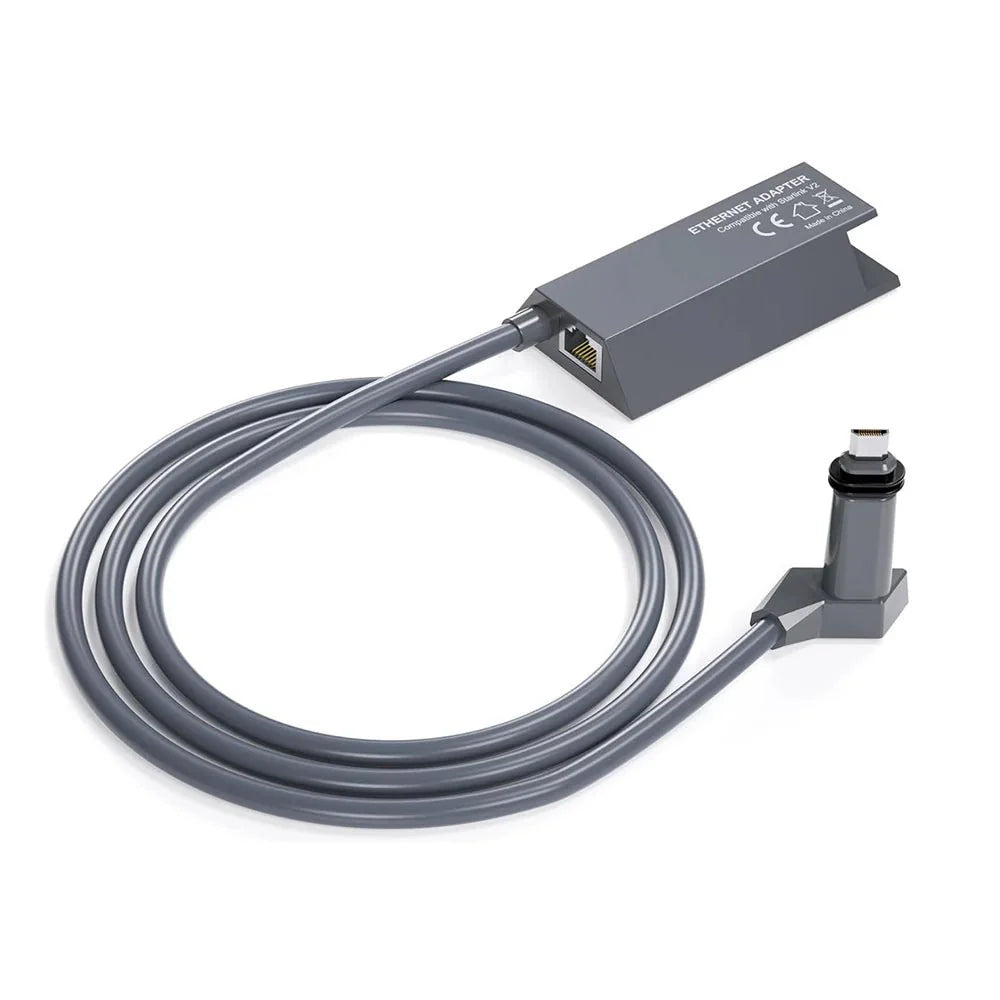




Wired Connection to RJ45 for Starlink Gen 2 Ethernet Adapter
$27.53 USD
-
Order now, estimated delivery: Calculating...
Free shipping on orders over $99
-
30-Day Returns & Exchanges
 Product Description
 Product Description
Ethernet Adapter for Starlink Gen 2 Standard Actuated
Add a standard RJ45 wired network connection to your Starlink Standard Actuated Gen 2 system for computers, televisions, network switches and third-party routers — with CAT6-grade construction and an outdoor-ready adapter housing.
Starlink Standard Actuated Gen 2 / V2 · RJ45 Ethernet · IP67-rated housing
🔌
Add a Standard RJ45 Port
Adds a conventional Ethernet connection to the Starlink Standard Actuated Gen 2 network, which does not include a built-in RJ45 LAN port on its Gen 2 router.
🛡️
CAT6 Shielded Construction
Pure copper conductors, gold-plated contacts and a multi-layer CAT6-grade shielding structure are designed to support stable wired data transmission with reduced interference.
🌧️
IP67-Rated Adapter Housing
Manufacturer-listed IP67 protection helps protect the adapter body against dust and water exposure in demanding residential, RV and outdoor Starlink installations.
Why Add Ethernet to Starlink Gen 2?
🖥️
Direct connection for wired devices
Connect an Ethernet-equipped desktop, laptop, smart TV, printer or other compatible network device without relying solely on Wi-Fi.
📶
Connect a third-party router
Use the RJ45 output to connect the WAN port of a compatible third-party router or mesh system when you want more control over your local network.
🔀
Add a network switch
A compatible Ethernet switch can be connected when multiple wired LAN ports are needed for several local devices.
🏠
Useful for fixed home or office setups
Ethernet is useful where computers, TVs, NAS systems, printers or network infrastructure already use physical cabling.
🚐
Rugged construction for mobile installations
Polycarbonate construction, shielded cable layers and manufacturer-listed weather resistance make the adapter suitable for many RV, workshop and outdoor setups.
Standard Actuated Gen 2 Only
This adapter is specifically sold for the rectangular motorized Starlink Standard Actuated Gen 2 / V2 dish system. It should not be ordered for Starlink Mini, Standard Gen 3, Gen 1, Flat High Performance or High Performance kits.
Built for Reliable Wired Signal Transmission


CAT6-Grade Cabling
CAT6-grade construction is used for the adapter's wired data path.
Multi-Layer Shielding
Shielding around the internal conductors helps reduce interference and protects the cable structure.
Anti-Aging Outer Jacket
The cable uses an exterior rubberized protective layer designed for long-term environmental exposure.
IP67 Manufacturer Rating
The adapter is marketed with IP67 protection against dust and water exposure.
Plug In, Add Ethernet, Connect Your Network
1. Confirm Starlink Hardware
Verify that your system is the rectangular motorized Starlink Standard Actuated Gen 2 / V2 kit.
2. Power Down Before Connecting
Disconnect Starlink power before inserting or removing the proprietary Starlink cable connections.
3. Install the Ethernet Adapter
Insert the adapter into the Standard Actuated Gen 2 network path according to the Starlink Gen 2 connection layout.
4. Connect an RJ45 Cable
Connect a standard Ethernet patch cable from the adapter's RJ45 port to your desired computer, switch or router.
5. Restore Starlink Power
Power the system back on and allow Starlink and the connected networking equipment to complete startup.
6. Configure Bypass Mode Only When Needed
If a third-party router will replace the Starlink router's networking functions, enable Bypass Mode in the Starlink App. Do not enable it simply because a normal wired device or network switch is connected.
Compatible with Standard RJ45 Ethernet Equipment
The RJ45 output can be used with compatible Ethernet-equipped computers, laptops, TVs, routers, printers and network switches. Standard Cat5e, Cat6, Cat7 or Cat8 Ethernet patch cables can physically connect to the RJ45 port.
Not for Gen 3, Mini or High Performance
A Starlink product being called “Gen 2” does not by itself guarantee compatibility. This adapter is sold specifically for Standard Actuated Gen 2 / V2. Starlink Standard Gen 3 and several Performance kits use different Ethernet and power architectures.
Specifications
| Attribute | Details |
|---|---|
| Product | Ethernet Adapter to RJ45 for Starlink Gen 2 |
| Compatible Starlink Kit | Starlink Standard Actuated Gen 2 / V2 |
| Standard Gen 1 | Not Compatible |
| Standard Gen 3 | Not Compatible / Adapter Not Required for Native Ethernet Setup |
| Starlink Mini | Not Compatible |
| Flat High Performance | Not Compatible |
| High Performance | Not Compatible According to Current Product Listing |
| Network Output | 1 × Standard RJ45 Ethernet Port |
| Cable Construction | CAT6-Grade |
| Conductors | Manufacturer-Listed Pure Copper |
| Contact Finish | Gold-Plated Contacts |
| Shielding | Multi-Layer Shielded Cable Construction |
| Exterior Cable Layer | Anti-Aging Protective Rubber |
| Adapter Housing | Polycarbonate |
| Manufacturer Water / Dust Rating | IP67 |
| UV Resistance | Manufacturer-Listed |
| Heat / Cold Resistance | Manufacturer Describes Heat-Resistant / Anti-Freezing Construction |
| Published Operating Temperature | Not Published |
| Published Ethernet Link Speed | Not Explicitly Published |
| Actual Internet Speed | Depends on Starlink Service, Network Conditions & Connected Equipment |
| Third-Party Router Support | Yes — via RJ45 WAN Connection |
| Bypass Mode | Required When a Third-Party Router Replaces the Gen 2 Router's Networking Functions |
| Network Switch Support | Supported — Bypass Mode Not Required for Standard Switch Use |
| External Power Adapter | Not Required as a Separate Product Power Source |
| Installation | Plug-and-Play Inline Ethernet Adapter |
| Tools Required | None for Normal Connection |
| Published Adapter Dimensions | Not Published |
| Package | 1 × Starlink Gen 2 Ethernet Adapter with RJ45 Port; Separate Ethernet Patch Cable Not Confirmed as Included |
Quick Answers
Which Starlink system does this adapter fit? +
It is designed specifically for Starlink Standard Actuated Gen 2 / V2, the rectangular motorized dish system.
Does it fit Starlink Standard Gen 3? +
No. Standard Gen 3 uses a different network and power architecture and already provides native Ethernet through its current hardware configuration.
Does it work with Starlink Mini? +
No. Starlink Mini uses a different Ethernet connection system.
Why do I need an Ethernet adapter for Gen 2? +
The Starlink Gen 2 router used with Standard Actuated does not include a built-in RJ45 Ethernet port. An adapter is therefore required to add a conventional wired connection.
Can I connect a computer directly? +
Yes. A compatible Ethernet-equipped computer can connect to the RJ45 output using a standard Ethernet patch cable.
Can I use a third-party Wi-Fi router? +
Yes. Connect the adapter's RJ45 output to the WAN port of the third-party router.
Do I need to enable Starlink Bypass Mode? +
Enable Bypass Mode when a third-party router will take over the Starlink router's networking role. Bypass Mode is not required simply to connect a normal wired device.
Can I connect a network switch? +
Yes. Starlink supports connecting a network switch through the Standard Actuated Ethernet Adapter when additional wired ports are required.
Is it Gigabit Ethernet? +
The current product pages identify CAT6-grade construction but do not explicitly publish the adapter's negotiated Ethernet link speed. This description therefore does not advertise a verified 1Gbps specification.
Will Ethernet make my Starlink internet faster? +
It provides a wired connection and can remove Wi-Fi from the local device-to-router path, but it does not increase the satellite service capacity itself. Actual internet speed still depends on Starlink service conditions and network equipment.
Is the adapter waterproof? +
The manufacturer lists the adapter with an IP67 rating. For exposed outdoor installations, all connected RJ45 cable joints should still be installed and protected appropriately for the environment.
Does the adapter need its own power supply? +
No separate wall power adapter is listed for this Ethernet adapter. It operates as part of the existing Starlink Gen 2 connection system.
Does it require software installation? +
No driver or dedicated adapter software is required for a normal wired connection. Starlink App configuration is only needed for features such as Bypass Mode.
Is an Ethernet patch cable included? +
The current product pages clearly show the Gen 2 Ethernet adapter itself but do not reliably confirm a separate RJ45 patch cable in the package. Plan to use a suitable Ethernet cable for the RJ45 connection unless your package listing specifically states otherwise.
 How can I contact Teskay?
 How can I contact Teskay?
- You can contact Teskay directly via the chat bubble in the bottom-right corner.
- You can also reach our customer support team by emailing kay@teskay.com.
We will respond to your message within 24 hours.
 Is it safe to make a payment on Teskay?
 Is it safe to make a payment on Teskay?
Yes, absolutely. Paying on Teskay is safe and secure.
We use Shopify Payments, Shopify’s official payment system, to help ensure that every transaction is protected throughout the checkout process.
Bank-level security
Your payment information is encrypted and processed securely. We do not see or store your full card details.
Fraud protection
Shopify Payments uses advanced fraud detection and risk analysis tools to help prevent unauthorized transactions.
3D Secure verification
For some transactions, your bank may require additional verification to confirm that only the authorized cardholder can complete the payment.
Encrypted checkout
All payment data is protected with industry-standard encryption during the entire checkout process.
Trusted payment networks
Payments are processed through trusted global card networks such as Visa, Mastercard, and American Express.
In short, your payment on Teskay is handled through a secure and trusted payment infrastructure used by millions of customers worldwide, so you can shop with confidence.
 Shipping Policy
 Shipping Policy
📦 Processing Time
Orders are usually processed within 48 business hours after payment confirmation.
Please note that processing times may be slightly longer during weekends, holidays, or peak periods.
Some Tesla-related tools or accessories may include labels or stickers inside the package for identification or packaging purposes.
🚚 Shipping & Delivery
We offer free worldwide shipping on orders over $99 USD.
Please note that certain remote areas, such as islands or locations with limited carrier access (including Puerto Rico), may require an additional shipping fee. If this applies to your order, our customer service team will contact you before shipment.
Estimated delivery time for most standard orders: 7–13 business days (excluding order processing time).
For custom-made items, such as wheels or steering wheels, shipping times may vary. The estimated shipping time will be confirmed separately by our customer service team.
📌 Important Notes
Please make sure your shipping address and phone number are accurate and complete at checkout.
Teskay is not responsible for delivery issues caused by incorrect or incomplete shipping information provided by the customer.
Additional charges may apply for remote or hard-to-reach areas.
💬 Need Help?
If you have any questions about shipping or delivery, please feel free to contact our customer support team at kay@teskay.com. We are always happy to help.
Thank you for choosing Teskay ❤️
 Refund Policy
 Refund Policy
At Teskay LLC, we want you to enjoy a worry-free shopping experience. If you are not satisfied with your purchase, we are here to help.
🔄 30-Day Return Policy
You may request a return within 30 days of receiving your order.
Please contact us within this period to start the return process.
📦 Return Reasons & Fees
- Defective, Damaged, or Incorrect Items
If the item you received is defective, damaged, or incorrect, we can offer you a full refund or a replacement.
All related costs will be covered by Teskay. - Non-Quality Returns
For returns due to personal reasons, such as change of mind, style preference, color preference, or ordering the wrong item, a 20% restocking fee will apply.
Return shipping costs are the responsibility of the customer.
📝 How to Start a Return
Please contact us at kay@teskay.com or through our live chat first.
Once your return request is approved, we will provide you with the return instructions.
Please do not send the item back without prior authorization, as unauthorized returns will not be accepted.
🚫 Non-Returnable Items
The following items cannot be returned unless there is a quality issue:
Customized products, such as steering wheels and rims
Gift cards
Hazardous materials or flammable items
If you are unsure whether your item is eligible for return, please contact us before making a purchase.
💰 Refunds & Exchanges
Once we receive and inspect your returned item, approved refunds will be issued to your original payment method within 1–3 business days.
Please note that the time it takes for the refund to appear in your account may vary depending on your bank or card issuer.
If you would like to exchange an item, we recommend returning the original item first and then placing a new order.
💬 Need Help?
Your satisfaction is important to us. If you have any questions, please feel free to contact us at kay@teskay.com. We are always happy to help.
Thank you for choosing Teskay ❤️
 How to view the installation video?
 How to view the installation video?
Questions & Answers loading...
You may also like
Free Shipping
Free worldwide shipping over $99

Secure Payment
100% secure payment processing

Easy Returns
30-day return policy on all items(Customized products excluded)

Service Excellence
Fast customer support response service